TecWeb/Order Manager Makes Purchasing Easy
For our North American customers, the ease and convenience of online ordering cannot be understated, especially when ordering product regularly.
Our eCommerce solution—the TecWeb/Order Manager from TecAlliance—is designed to provide a more streamlined experience and 24/7 access specifically for the turbo aftermarket.
4 Tips for Self-Service
One of the key features of TecWeb is the Self-Service functionality. Below are some key tips for making the most of this tool.
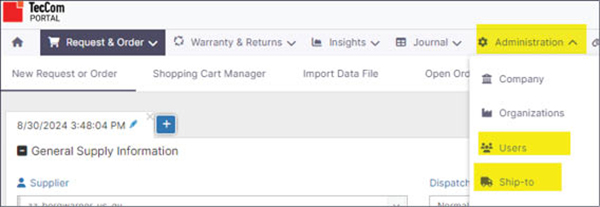
1. Users and Locations: Add, edit or remove Users and Ship-to Locations under the Administration tab.
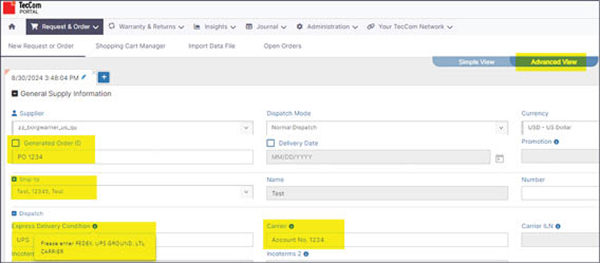
2. Adding Shipping Instructions: Place an order with shipping instructions under the Request & Order tab. IMPORTANT: You must be in the Advanced View.
3. PO Numbers: Add your own PO number by unchecking Generated Order ID and entering the number. Reminder: Select Ship-to address in the dropdown section and add Freight carrier information in the Dispatch Area.
4. Submitting an Order: Make sure there are no empty lines in your order. To delete empty lines, check the box of the line with the missing part number and click the trashcan icon. Then click Request & Order button for processing.

*Please note, this applies to customers located in North America.
Photo