MatchBot: A Shortcut Method
If you need help finding the right turbo for your application, BorgWarner’s MatchBot can help!
MatchBot is an interactive, web-based tool that takes your input and generates the information you need to find the right turbo.
With the right info, MatchBot can really narrow in on your needs. The good news is that you don’t have to have all the inputs to get started.
Follow this shortcut:
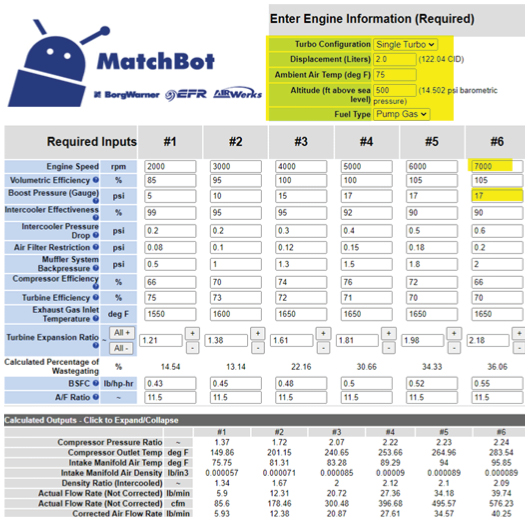
1. Enter the five values (highlighted in yellow on the image) for the engine type:
- Turbo configuration
- Displacement
- Ambient air temp
- Altitude
- Fuel type
2. Go to Required Inputs #6 (highlighted in yellow on the image to the right) and enter the engine speed (rpm) and boost pressure (psi).
3. For the first five points, simply enter 100 for the engine speed.
4. Scroll down to the map. Point #6 needs to land on the right side of the map. If point #6 isn’t on the map, then select a different compressor.
Additional Quick Tips:
- After matching your compressor stage, be sure to match the turbine stage. You can learn more about this in our YouTube video Part 2: Compressor and Turbine Selection.
- Check the engine power rating to make sure it aligns with your goals.
- Remember to use the provided URL to save your work. Learn more in our YouTube video Part 4: Turbine Efficiency, Wheel Speeds and Saving your Work.
MatchBot Video Series
To help you get the most out of MatchBot, check out our video tutorials online.
Part 1: Inputs and Numerical Outputs
Part 2: Compressor and Turbine Selection
Part 3: Match Sizing Comparisons
Part 4: Turbine Efficiency, Wheel Speeds and Saving your Work
Photo